forge:~$ cat about
forgeOS is Arch Linux built for playing games, making games and making music. It keeps Arch's packages and rolling releases, and adds its own tuned kernel, a signed package repository of its own, a themed Hyprland desktop, and upgrades that are tested before they apply.
The kernel: linux-forgeos
forgeOS builds its own kernel from source, pinned to an exact release and verified by signature. Its kernel patches and tunings come from CachyOS; the build choices are forgeOS's:
- The current Linux release with performance patches and configuration, and the EEVDF CPU scheduler.
- Compiled for x86-64-v3 (AVX2: Intel Haswell from 2013, AMD Zen and newer) with Clang ThinLTO and
-O3, not for the lowest common x86-64. - 1000 Hz timer, full preemption, full tickless and transparent hugepages, aimed at responsiveness under load.
- sched-ext built in, so the scx userspace CPU schedulers can replace the kernel's scheduler while the system runs.
- NVIDIA open module built for this exact kernel for the live system; installed systems rebuild it automatically with DKMS when drivers update.
Every recipe change, compiler setting and source version is recorded with each build, and the recipe is published in sources/.
Tuned system settings
Much of how fast a system feels comes from kernel settings outside the kernel build. forgeos-tuning sets them from the first boot:
Memory
Compressed swap in RAM (zram with zstd), tuned swappiness, cache pressure and dirty-page writeback, and transparent hugepages that defer defragmentation.
Storage
An I/O scheduler chosen per device type: kyber for NVMe, mq-deadline for SATA SSDs and SD cards, bfq for hard disks.
Games on Wine and Proton
ntsync is loaded at boot, so Windows games get the kernel's native implementation of Windows synchronization primitives.
Audio
Realtime priority and CPU latency control for the audio group, Intel HDA power saving off on AC (no crackles), PipeWire at 44.1 to 96 kHz without resampling.
CPU schedulers are one command away: the scx schedulers (scx_lavd, scx_bpfland and others) are installed but off, so the kernel's own scheduler stays the default until you choose. The guide shows how.
Its own repository
forgeOS has its own pacman repository, [forgeos], served from this site. It carries the kernel, the system tuning, the desktop and its configuration, the installer, the upgrade tool, Tweaks, the calendar, and forgeOS's own applications. Every package and the database are signed with the forgeOS key, which every installation trusts through forgeos-keyring.
The repository is listed above Arch's, so forgeOS's packages take priority; everything else comes straight from Arch's mirrors. A forgeOS update and an Arch update arrive through the same command.
Built on Arch, not a fork
forgeOS does not rebuild Arch. It uses Arch's own repositories (core, extra, multilib), Arch's pacman and the same rolling updates. The Arch Wiki applies, the AUR works, and you can install any Arch package. If Arch has a problem, forgeOS has it too, and Arch's fix is forgeOS's fix.
Why Btrfs
forgeOS installs on Btrfs with separate subvolumes for the system, /home, logs, the package cache and upgrade state. That layout is what several features rest on:
- Snapshots before upgrades. A snapshot is an instant, read-only copy of the system that only stores what changes afterwards.
forge system-upgradetakes one before every upgrade, so there is always a way back. - Reinstall without losing your files.
/homeis its own subvolume, so the installer can replace the system and leave your files and settings where they are. - Compression. Files are compressed with zstd as they are written: less disk space and less data to read, at almost no CPU cost.
- Checksums. Every block is checksummed, so silent disk corruption is detected instead of quietly read back.
- Instant copies. Copying a file can share its data until either copy changes, so large copies take no time or space.
What is different from a regular Arch install
A regular Arch install
- Arch's generic
linuxkernel, built for any x86-64 CPU. - Stock system settings: no zram, no I/O scheduler rules, no realtime audio limits, no ntsync.
- You partition, format and bootstrap by hand, following the installation guide.
- You get a console. Desktop, login screen, audio, Bluetooth, graphics drivers and theming are yours to set up.
pacman -Syuupgrades the running system directly.
forgeOS
linux-forgeos: built for x86-64-v3 with ThinLTO, plus sched-ext schedulers ready to switch on.- Tuned memory, storage, Wine/Proton and audio settings from the first boot.
- A guided installer: whole disk, optional encryption, Btrfs; it can reinstall or replace another Linux and keep
/home. - A themed Hyprland desktop with login screen, NVIDIA hybrid graphics, Steam, PipeWire and Bluetooth set up.
forge system-upgradesnapshots, tests the full upgrade on a copy, and asks before applying it.
For making things
Two installer options turn a gaming machine into a workstation:
Game development
GCC, Clang/LLVM, mold, ccache, CMake, Ninja, Meson, GDB, LLDB, Valgrind, perf, heaptrack, SDL3, GLFW, the Vulkan SDK with validation layers, glslang, shaderc, SPIRV-Cross, DXC and RenderDoc, plus MinGW-w64 and Wine to build and test Windows versions.
Audio production
qpwgraph and Carla, LSP, x42, Calf, Surge XT and Cardinal plugins, and yabridge with Wine for Windows VST2/VST3 plugins. Every install already runs PipeWire with its JACK interface, so DAWs like Reaper, Bitwig and Ardour work as they are.
The desktop
Hyprland
A tiling Wayland desktop with waybar, wofi, mako and kitty, plus forgeOS's own Quickshell screens: login, lock, window overview, power menu and calendar.
forgeOS Tweaks
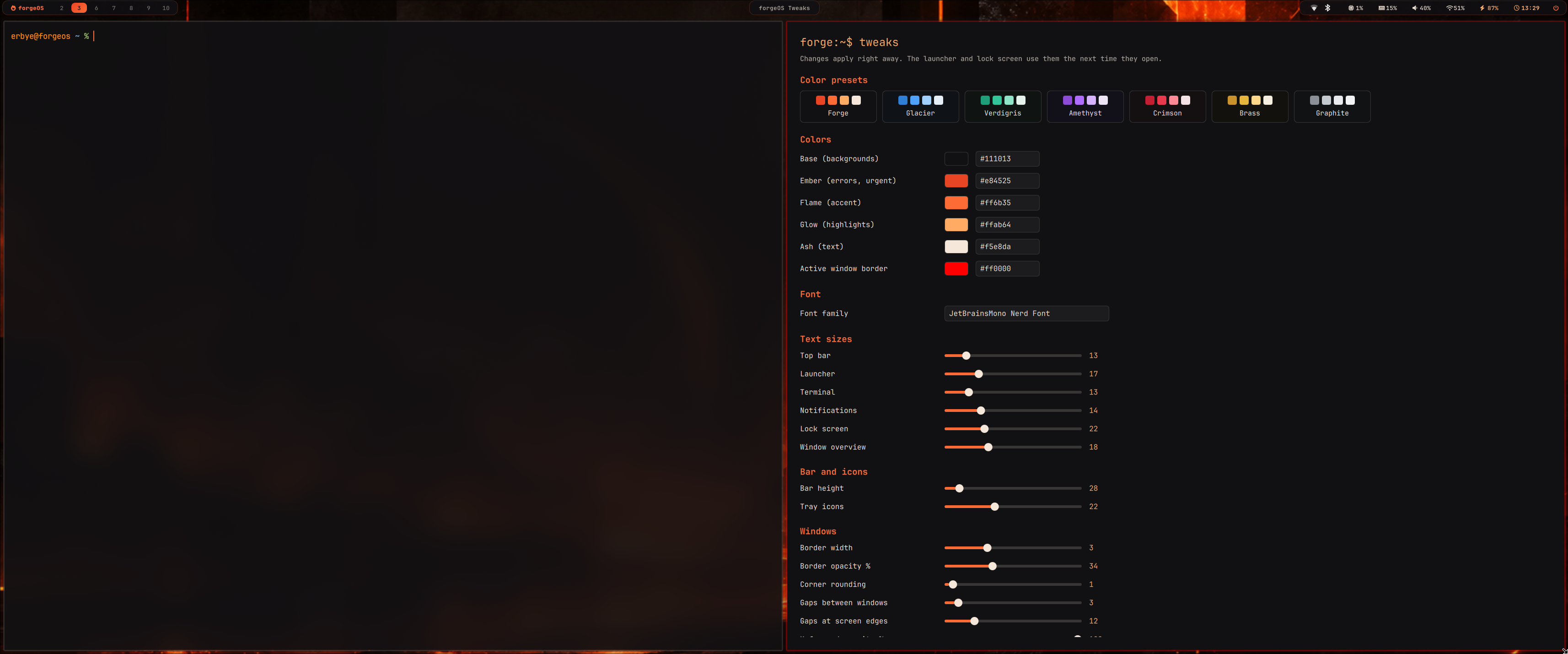
Seven color themes with matching wallpapers, your own colors, fonts, sizes, gaps, borders and blur, applied live across the whole desktop.
Graphics
NVIDIA (Turing and newer, open kernel modules) with Intel hybrid laptops: the desktop runs on Intel, games use the NVIDIA GPU with prime-run.
Everyday apps
Vivaldi or Firefox, Thunar, mpv, imv, Pinta, KeePassXC, Remmina, btop, Halloy and the usual desktop utilities.
What it is not
- Not for older CPUs: the kernel needs x86-64-v3 (AVX2).
- Not for Secure Boot or BIOS-only machines yet: it needs 64-bit UEFI with Secure Boot turned off.
- Not dual-boot friendly yet: the installer uses a whole disk.